DocsRun your app
Sleep and wake
An idle app can sleep and wake on the next request. What that costs, what it saves and what an app loses while it sleeps.
Use with AI
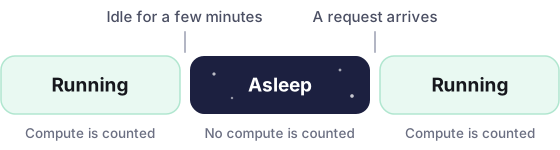
An app that nobody visits does not have to run. It can sleep, and wake when the next request comes in. While it sleeps, you are not charged for compute.
How it works
Section titled “How it works”- The app is idle. No request has come in for a few minutes.
- It sleeps. Its replicas stop. Nothing runs, and no compute is charged.
- A request arrives. The platform holds the request and starts a replica.
- It answers. The request goes through once the app listens. That first request waits for as long as your app takes to start.
The two switches
Section titled “The two switches”Both are under Scaling. A change applies with the next deployment.
| Switch | On | Off |
|---|---|---|
| Keep one replica always on | One replica runs all the time. No waiting, and jobs keep running. That replica is charged all month | The app sleeps when it is idle. You pay only while it runs |
| Wake up fast | A sleeping replica keeps its memory, so it answers without starting again | A sleeping replica starts from scratch on the next request |
Wake up fast
Section titled “Wake up fast”With Wake up fast, an idle replica is paused with its memory kept. The first request after a quiet time is answered without the app starting again. Sleeping still costs nothing.
- Switch it off if the app has trouble with database connections that went stale while it slept.
- Sizes with more than 2 GB of memory always start fresh.
What an app loses when it sleeps
Section titled “What an app loses when it sleeps”Without Wake up fast, a sleeping app is stopped. When it wakes, it starts like new:
- Memory is empty. Sessions, caches and counters kept in memory are gone. Keep them in a database or a store outside the app.
- Files it wrote can be gone. The disk of the app is temporary. See Express.
- Open connections are closed. The app connects to its database again when it starts.
Timers and jobs
Section titled “Timers and jobs”A sleeping app wakes only for a request. A timer, a scheduled job or a queue worker inside the app does not run while it sleeps.
If the app does work without a visitor, keep Keep one replica always on switched on. The dashboard reminds you when it finds a package for scheduled jobs or queues in your package.json.
With more than one replica, every running replica runs the job. Work that must happen once needs a lock in your own code.
Sleeping is not paused
Section titled “Sleeping is not paused”Pause is something you do by hand, under More actions. A paused app has no replicas and does not wake for a request. It stays off until you choose Resume.
© 2026 Orbit